
GMC Yukon XL 2000–2006
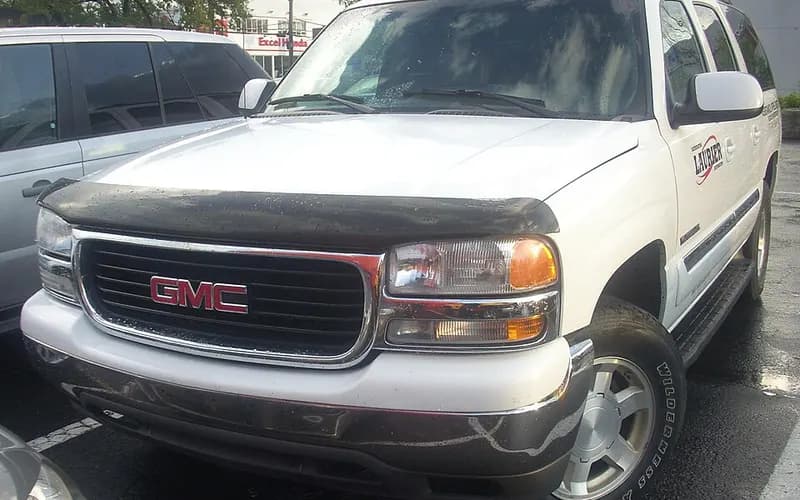
Common on this vehicle:
Record by record
8 records state a cause or a remedy. Each record is shown as short labels in the order fault → finding the cause → correction. Press a label to narrow to the records that state it.
Component named as the cause
A ribbon is as wide as the records that state both of its ends (only the commonest are drawn). A record that names several symptoms or components runs through each. Orange is records that say the fault came back or was not fixed. Results come from owners’ reports only; one that does not say is “result not stated”. None of this is a likelihood of a cause or a rate at which work succeeds.
Read the records one by one (4)
ELECTRICAL SYSTEM4
Manufacturer communication2000–2006 GMC YUKON XL DENALI ・ 2021-04-20
OnStar Voice Fallback Number Update
1Fault
Not stated
2Finding the cause
3Correction
Read the sentences of the record
- Remedy
- OnStar® Voice Fallback Number Update Some customers may have received a letter from OnStar® stating that "We recently tried to provide a software update to the OnStar® hardware in your vehicle. However, your system could not be updated remotely. As a result, some of your OnStar® system functions may not be working as expected." The customer is further instructed in this letter to "Please contact your dealer  or any dealer near you  as soon as possible to schedule an appointment for this no-cost software update. Your dealer will reprogram your OnStar® module with an update. This is for vehicles that have previously received the Canada upgrade as described in Service Bulletin #15-08-44-001F."
Manufacturer communication2000–2006 GMC YUKON XL ・ 2018-05-21
OnStar Module Software Update via GSA
1Fault
Not stated
2Finding the cause
Steps to confirm (in the document’s order)
- Verify in the Investigate Vehicle History (IVH) whether the upgrade has been completed before proceeding.
3Correction
Repair
- Because GDS 2 will not decode the VIN of a vehicle originally supported by the Tech 2, a manual selection must be performed.
- Select Additional Options, then select the OnStar Canada GSM option.
Caution
- On GSM-upgraded vehicles, the GDS 2 must be used for scan tool communication with the Telematics Communication Interface Control Module (TCICM), or OnStar module.
- All scan tool communications with other modules on these vehicles continue to be performed using the Tech 2.
Read the sentences of the record
From the manufacturer’s document
- Applies to:The model list addresses 2000-2009 GM passenger cars and light duty trucks.
- Applies to:The bulletin only applies to vehicles that have been involved in the Canadian OnStar cellular communication upgrade.
- Confirm:Verify in the Investigate Vehicle History (IVH) whether the upgrade has been completed before proceeding.
- Caution:On GSM-upgraded vehicles, the GDS 2 must be used for scan tool communication with the Telematics Communication Interface Control Module (TCICM), or OnStar module.
- Caution:All scan tool communications with other modules on these vehicles continue to be performed using the Tech 2.
- Repair:Because GDS 2 will not decode the VIN of a vehicle originally supported by the Tech 2, a manual selection must be performed.
- Repair:Select Additional Options, then select the OnStar Canada GSM option.
Open the manufacturer’s document (PDF) ↗ The points above were read from this document.
- Remedy
- This informational bulletin explains how to update the older Onstar module software to new software over GSA.
Manufacturer communication2006 GMC YUKON XL ・ 2018-01-16(4 earlier editions of this document folded here)
OnStar System Will Not Power Up – Preliminary Information
1Fault
Not stated
2Finding the cause
Not stated
3Correction
Repair
- With the issue present, turn off the ignition, cancel RAP, and perform a 5 minute power cycle of the VCIM.
Read the sentences of the record
From the manufacturer’s document
- Applies to:Applies to 2006-2018 GM passenger cars and trucks with OnStar (UE1) Gen7, Gen8, Gen9, FCP1 or Gen10.
- Repair:With the issue present, turn off the ignition, cancel RAP, and perform a 5 minute power cycle of the VCIM.
Open the manufacturer’s document (PDF) ↗ The points above were read from this document.
- Remedy
- This Preliminary Information communication provides information to the technician about vehicles that have an OnStar system that will not power up. Technician should turn off the ignition and cancel retained accessory power. After the vehicle has powered down remove power to the OnStar module for five minutes. After the power has been removed for five minutes, if the OnStar system is working release the vehicle. If the OnStar system is still inoperative continue with published Service Information diagnostics.
Manufacturer communication2005–2006 GMC YUKON DENALI XL ・ 2017-04-10
OnStar System Power-Up Issue Information
1Fault
Not stated
2Finding the cause
3Correction
Read the sentences of the record
- Remedy
- THIS PRELIMINARY INFORMATION COMMUNICATION PROVIDES INFORMATION TO THE TECHNICIAN ABOUT VEHICLES THAT HAVE AN ONSTAR SYSTEM THAT WILL NOT POWER UP. TECHNICIAN SHOULD TURN OFF THE IGNITION AND CANCEL RETAINED ACCESSORY POWER. AFTER THE VEHICLE HAS POWERED DOWN REMOVE POWER TO THE ONSTAR MODULE FOR FIVE MINUTES. AFTER THE POWER HAS BEEN REMOVED FOR FIVE MINUTES, IF THE ONSTAR SYSTEM IS WORKING RELEASE THE VEHICLE. IF THE ONSTAR SYSTEM IS STILL INOPERATIVE CONTINUE WITH PUBLISHED SERVICE INFORMATION DIAGNOSTICS.
Showing 4 of the 8 you can open. Narrow the search to see the rest.